Configuration
There are few changes that can be done to change the default behaviour of the proxy builds.
You should also be aware that the Fable.Electron.Remoting.Main module has
an extra config compared to the others.
On all process modules (Main, Preload, and Renderer), start from Remoting.createIpc().
When the proxies are created on the Renderer side, they are exposed via the Preload step on the window object as a property.
The name of this property is created based on the combination of a 'base' name in the config and the name of your Record type.
By default, the prefix is FABLE_REMOTING and it is mapped with the type name
as follows:
$"{baseName}_{typeName}"
Example
Using the debugger, you can navigate to Sources and pause so that you can view the window properties in Scope - Global.
type TextHandler = { ... }
type CounterHandler = { ... }
let apiNameMap = fun baseName typName ->
    $"{baseName}_{typName}"
Remoting.createIpc ()
|> Remoting.withApiNameBase "FABLE_REMOTING"
|> Remoting.withApiNameMap apiNameMap
|> Remoting.buildTwoWayBridge<CounterHandler>
Remoting.createIpc ()
|> Remoting.withApiNameBase "FABLE_REMOTING"
|> Remoting.withApiNameMap apiNameMap
|> Remoting.buildBridge<TextHandler>
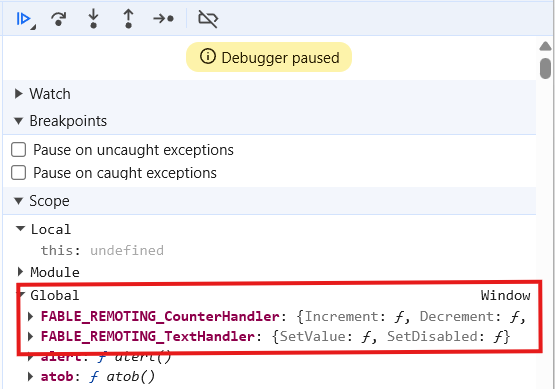
Similarly, the Main and Preload step share a named communication - channel-name.
The channel-name is unique for each record field, and is a combination of
the type name and the field name, which is mapped by default as follows:
$"{typeName}:{fieldName}"
Example
type TextHandler = {
    SetValue: ...
    SetDisabled: ...
 }
type CounterHandler = {
    Increment: ...
    Decrement: ...
 }
let channelNameMap = fun typName fieldName ->
    $"{typName}_{fieldName}"
Remoting.createIpc ()
|> Remoting.withChannelNameMap channelNameMap
|> Remoting.buildTwoWayBridge<CounterHandler>
Remoting.createIpc ()
|> Remoting.withChannelNameMap channelNameMap
|> Remoting.buildBridge<TextHandler>
Would use the channels CounterHandler_Increment, CounterHandler_Decrement, TextHandler_SetValue and TextHandler_SetDisabled.
Common
Remoting.createIpc ()
|> Remoting.withApiNameBase "FABLE_REMOTING"
Remoting.createIpc ()
|> Remoting.withApiNameMap (fun baseName typeName -> $"{baseName}_{typeName}")
Remoting.createIpc ()
|> Remoting.withChannelNameMap (fun typeName fieldName -> $"{typeName}:{fieldName}")
Main Specific
When using Remoting.buildProxySender on the Main process, you will be required to
pass all the windows that you wish to send the messages to.
Remoting.createIpc ()
|> Remoting.withWindow mainWindow // repeat this as many times as required

// alternatively, create your array of windows and feed it in
let windows = [| ... |]
Remoting.createIpc ()
|> Remoting.setWindows windows